

1 / 4 · Click to enlarge
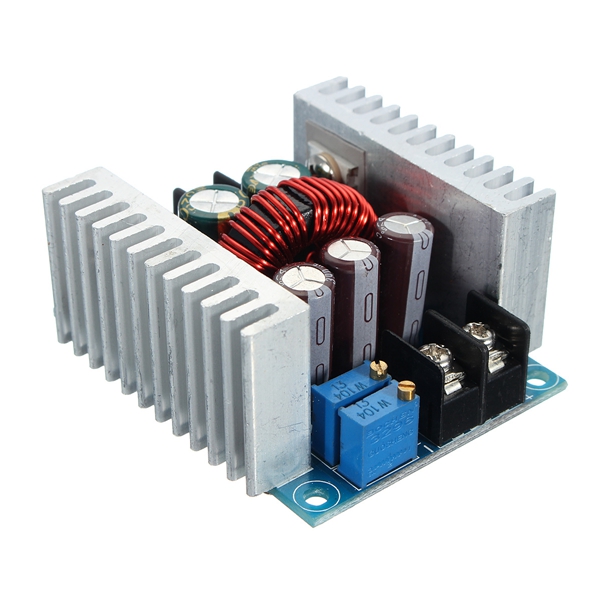
Geekcreit® DC 6-40V To 1.2-36V 300W 20A Constant Current Adjustable Buck Converter Step-down Module Board With Short-circuit Protection Function
5.01,112 ratingsThe Geekcreit® DC 6-40V To 1.2-36V 300W 20A Constant Current Adjustable Buck Converter Step-down Module Board With Short-circuit Protection Function by Geekcreit is a mid-range electronics designed for everyday users. Customers praise its excellent build quality and fast and responsive. 100% of buyers rate it 4★ or above.
Available Offers
Free Delivery on this order. No minimum order value.
15-Day Easy Returns — hassle-free return & full refund.
Secure Payment — 100% safe checkout with UPI, Cards & Net Banking.
Available Offers
5% Cashback
Pay with UPI & get 5% cashback (up to ₹50) via Razorpay
No-Cost EMI
Available on select bank cards at checkout. 0% interest for 3 months.
Free Shipping
Free delivery on all orders. No minimum order value.
Cash on Delivery
COD available on orders up to ₹5,000 across India.
Ideal For
About This Product
The Geekcreit® DC 6-40V To 1.2-36V 300W 20A Constant Current Adjustable Buck Converter Step-down Module Board With Short-circuit Protection Function by Geekcreit is a mid-range electronics designed for everyday users. Customers highlight its excellent build quality and fast and responsive.
Customer Verdict
100% of buyers rated this product 4 stars or above. The most appreciated qualities are: excellent build quality, fast and responsive, clear and bright display, compact and portable.
Why Buy from Pricio?
Pricio sources this product directly, cutting out multiple middlemen. Every order includes free shipping, a 15-day return policy, and secure payment via Razorpay.
Specifications:
Color: Silver
Material: Metal
Size: Approx. 60 x 52 x 27mm / 2.36 x 2.05 x 1.06''
Input Voltage: DC 6-40V (10V to 40V is suggested)
Output Voltage: DC 1.2-36V
Output Current: 20A(max.), 15A (suggested)
Efficiency: 97% (24V to 12V, 20A)
Output Ripple: ≤50mV
Wiring Method: Terminal
Short Circuit Protection: Self-recovery (cannot short circuit for a long time)
VO+: Output positive
VO-: Output negative
+IN: Input positive
-IN: Input negative
CV: Output voltage adjustment
CC: Output current adjustment
EN: Enable, low voltage level shut off output; suspension, high voltage level is effective
When input and output is common grounded, no-load CV output constant voltage, CC output constant current
Working Tempreture: -10°C-75°C
Features:
With a wide input voltage range from 6V to 40V, the step-down converter can accurately adjust output voltage and current
The efficiency can be up to 96%, measured at 20A, converting 24V to 12V
Designed with 75V/80A large current dual MOS tube
The buck module has 2 heat sink that could enhance heat dissipation
Wiring is convenient with these large current 30A screw terminals
Input and output use high frequency low resistance electrolytic capacitor, low ripple, stable output
Stable and reliable
Fine workmanship and durable
Package included:
1 x 300W 20A adjustable step-down converter module
, ,
, ,
,







.jpg)
