

1 / 14 · Click to enlarge
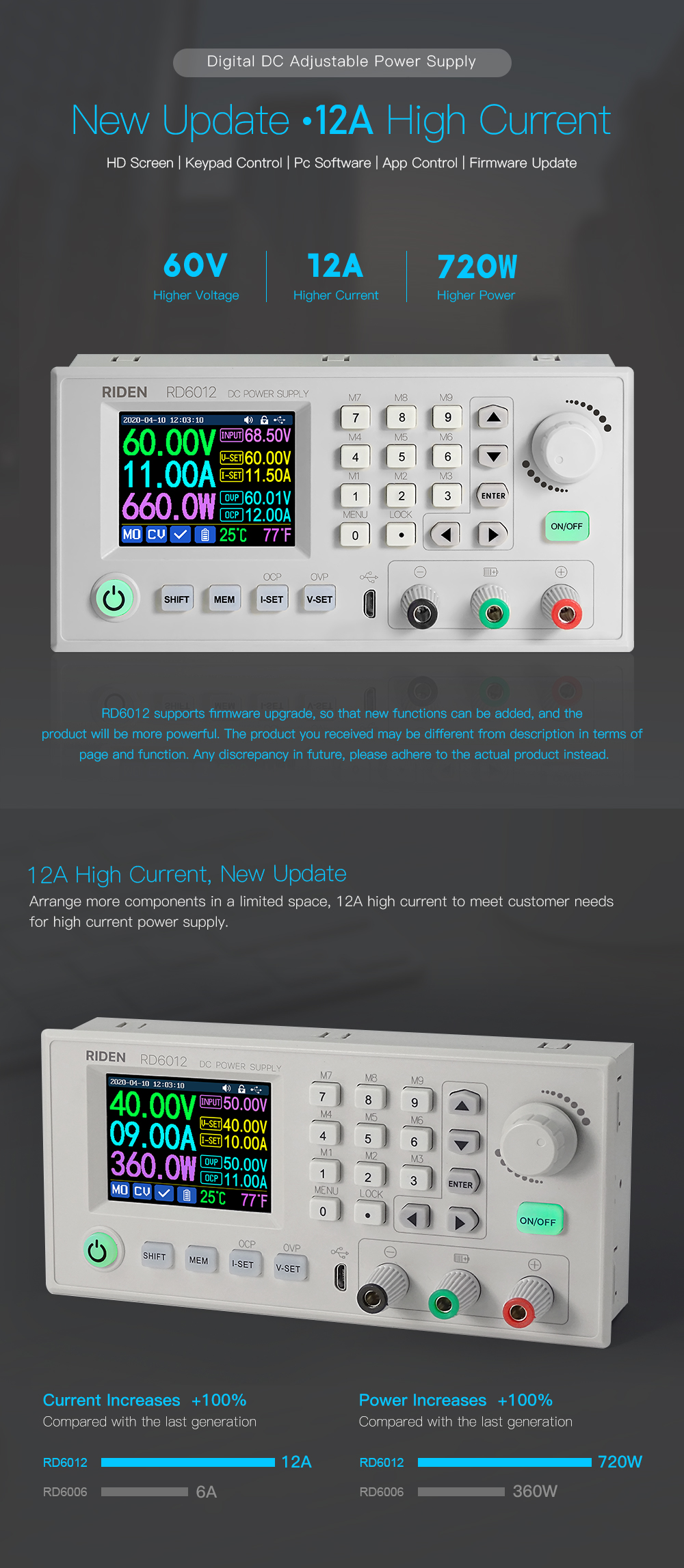
RIDEN® RD6012P RD6012PW 60V 12A DC Voltage Step Down Power Supply Module USB WiFi Adjustable Buck Converter Voltmeter
5.019 ratingsThe RIDEN® RD6012P RD6012PW 60V 12A DC Voltage Step Down Power Supply Module USB WiFi Adjustable Buck Converter Voltmeter by RIDEN is a premium electronics designed for premium buyers. It features Model: RD6006(W) and Input voltage range: 6-70.00V. Customers praise its excellent build quality and great value for money. 100% of buyers rate it 4★ or above.
Available Offers
Free Delivery on this order. No minimum order value.
15-Day Easy Returns — hassle-free return & full refund.
Secure Payment — 100% safe checkout with UPI, Cards & Net Banking.
28% Off — you save ₹4,944 on this product!
Available Offers
5% Cashback
Pay with UPI & get 5% cashback (up to ₹50) via Razorpay
No-Cost EMI
Available on select bank cards at checkout. 0% interest for 3 months.
Free Shipping
Free delivery on all orders. No minimum order value.
Cash on Delivery
COD available on orders up to ₹5,000 across India.
Quick Specs
Ideal For
About This Product
The RIDEN® RD6012P RD6012PW 60V 12A DC Voltage Step Down Power Supply Module USB WiFi Adjustable Buck Converter Voltmeter by RIDEN is a premium electronics designed for premium buyers. Customers highlight its excellent build quality and great value for money.
Key Specifications
- Model: RD6006(W)
- Input voltage range: 6-70.00V — reliable connection even at a distance
- Output voltage range: 0-60V — reliable connection even at a distance
- Output current range: 0-6.000A — reliable connection even at a distance
- Output power range: 0-360W — reliable connection even at a distance
- Input voltage measurement resolution: 0.01V — works with standard household power
- Output voltage setting measurement resolution: 0.01V — works with standard household power
- Output current setting measurement resolution: 0.001A
Customer Verdict
100% of buyers rated this product 4 stars or above. The most appreciated qualities are: excellent build quality, great value for money, fast and responsive, clear and bright display.
Why Buy from Pricio?
Pricio sources this product directly, cutting out multiple middlemen. Every order includes free shipping, a 15-day return policy, and secure payment via Razorpay.
Note before buying:
NOTE for Switching power supply: When get the PSU, please use multimeter to check if the real output voltage is stable and fits the rated voltage, to see if it is damaged on the way, if the output is abnormal, please contact us, do not connect it to RD power supply to avoid more loss
1. RD6012P series has two versions:RD6012P and RD6012P-W,RD6012P-W have WIFI board , RD6012P don't have . RD6012P-W can use WIFI board to connect APP, also use USB micro cable to connect PC solftware . RD6012P don't have WIFI board, only support PC software by connecting with USB micro cable, no support APP. For wifi board to connect PC software, now it did not support.
Note: WiFi connection is a test function, due to poor compatibility of some computers, if you cannot connect PC software via WiFi, please ignore this function. Forthis function, we do not provide any guarantee and technical support, and we will decide whether to keep this function based on customer feedback.
2. for PC software, it only support win 7 and above for now. For APP, it only support android 5.0 and above.For APP and PC software, because there may be incompatibilities problems, please download first before buying , if you can download and install, you can make order, or else stop buying. If you don't test the PC software and APP function before buying and find that the products works fine except the PC software or APP, we refuse to refund.
3. if you connect inductive load (such as motor), the max working current is 1/3 of range. don't exceed it.
Package includes:
1 x RD6012P Power supply only
wifi board (optional)
All RD6012P/RD6012PW instruction and case installation instruction download Link:
1. RD6012P(W) operation instructon, PC software instruction, APP instruction ,APP and PC software download link:
A: Main download llink: https://drive.google.com/drive/folders/1NdHp_BiQKGyVf5ahfyhNrGkTcO2AzWC0?usp=sharing
2. Android APP: download at file link:
Support android 5.0 -android 10.0
IOS APP download: Search RdPower to download , support IOS10.0-IOS13.4 System
Android APP Google Playdownload: Search RdPower to download , support Android 5.0 and above phone
3. Instruction video for manual(similar to RD6006):
a. Battery Charging Function Introduction: https://youtu.be/irTbqfqtgU0
b. Output Voltage and Output Current Setting: https://youtu.be/S6Kan66dNsk
c. Data Group Quick Storage and Call out: https://youtu.be/eo5saPjOGpo
d. Keypad lock and unlock: https://youtu.be/zxpmasJyQ6Y
e. System Setting: https://youtu.be/Q9d3rIgIrOc
f. Main Page Style Setting: https://youtu.be/f51VDiY2VHE
g. Storage Data Setting: https://youtu.be/i1kTeurS13I
h. System Information: https://youtu.be/Um4NQObeeJE
i. IOS APP Download, Installation and Connection: https://youtu.be/nH2HYwop0TE
j. IOS APP Operation: https://youtu.be/lXSw1CM9IY8
k. Android APP Download, Installation and Connection: https://youtu.be/QwyBEUCnp9c
l. Anroid APP Operation: https://youtu.be/hqrF4keTfbE
m. PC Software Download and basic operation: https://youtu.be/mjt1RMaah1Y
o. Firmware Upgrade: https://youtu.be/NOoLfDw0DiY
p. Calibration: https://youtu.be/c9sn1wY2mjE
q. Logo Update: https://youtu.be/vuVhBsohWts
r. RD6012 wifi connection Problem and solution: https://www.youtube.com/watch?v=7sTtc1kweJM
4. RD6012P and S800 case assemble instruction:
https://drive.google.com/drive/folders/1NdHp_BiQKGyVf5ahfyhNrGkTcO2AzWC0?usp=sharing
5. Supported power supply:
For input AC-DC switch power supply, we recommend 800W switch power supply (S800 case leave fix hole size for this version),you can see more parameters about the800W switch power supply
6. Friendly reminder:
-There may behigh-frequency noise when the 800W 65V switch power supply is powered on and there is no load, which can be improved by adding a load resistoras shown in the figure! But for some people, they can still hear the noise, if you mind the noise, please do not buy this power supply, 800W 68V version does not need it
-You can only connect the cables with a foundation in electronic and electrical engineering and it must be reliably grounded!
-Due to express delivery, some power supply warranty labels may be damaged, which does not affect product warranty!
-Due to the different power supply production batches, the internal material details may be different, hereby explain!
7. There is a BACKUP fuse in the RD6012P/RD6012PW box, if you burn the fuse, you can insert the fuse in the socket next to the burned one for temporary use, but the socket can only support under 10A for short time usage, so it is better to remove the damaged fuse and solder the good fuse on the same position
8. When intall our 800W PSU into our case, please follow our instruction to assemble, do not remove the shell of the PSU to use. After the shell of the switching power supply is removed, the structural change of the heat dissipation system will lead to insufficient heat dissipation,and some components will be overheated and damaged, in this case we don't offer after sell service
Technical parameters:
①:Ripple measurement method: noise and ripple are measured at X1 range, AC coupling, 20MHz of bandwidth on your oscilloscope with a 0.1uF parallel capacitor at the output terminals
②for example: input voltage is 24V,the max output voltage is 19.8V.







.jpg)
