
1 / 7 · Click to enlarge
Wireless bluetooth 5.0 Mini Thermometer Hygrometer Smart Data Logger Temperature Humidity Recorder Meter APP Control MEMS Sensor Alarm
The Wireless bluetooth 5.0 Mini Thermometer Hygrometer Smart Data Logger Temperature Humidity Recorder Meter APP Control MEMS Sensor Alarm is a mid-range product designed for everyday users.
Available Offers
Free Delivery on this order. No minimum order value.
15-Day Easy Returns — hassle-free return & full refund.
Secure Payment — 100% safe checkout with UPI, Cards & Net Banking.
Color: White
Available Offers
5% Cashback
Pay with UPI & get 5% cashback (up to ₹50) via Razorpay
No-Cost EMI
Available on select bank cards at checkout. 0% interest for 3 months.
Free Shipping
Free delivery on all orders. No minimum order value.
Cash on Delivery
COD available on orders up to ₹5,000 across India.
Ideal For
About This Product
The Wireless bluetooth 5.0 Mini Thermometer Hygrometer Smart Data Logger Temperature Humidity Recorder Meter APP Control MEMS Sensor Alarm is a mid-range designed for everyday users. It delivers reliable performance at an accessible price.
Why Buy from Pricio?
Pricio sources this product directly, cutting out multiple middlemen. Every order includes free shipping, a 15-day return policy, and secure payment via Razorpay.
Specification:
1. Temperature range: -20 ~65°C (-4 ~ 150℉)
2. Humidity range: 0-100%RH
3. Temp Accuracy: ±0.5°C
4. Humidty Accuracy: ±5.0 %
5. Size: 15mm*35mm
6. Wireless Range :50M
7. Free APP Control:Yes(Read Manual)
8. Sensor Type:MEMS
9. Materiais:ABS
10. Battery:1*CR2477and battery can be replaced.
11. History Memory Time :Every 10 Mins
Features:
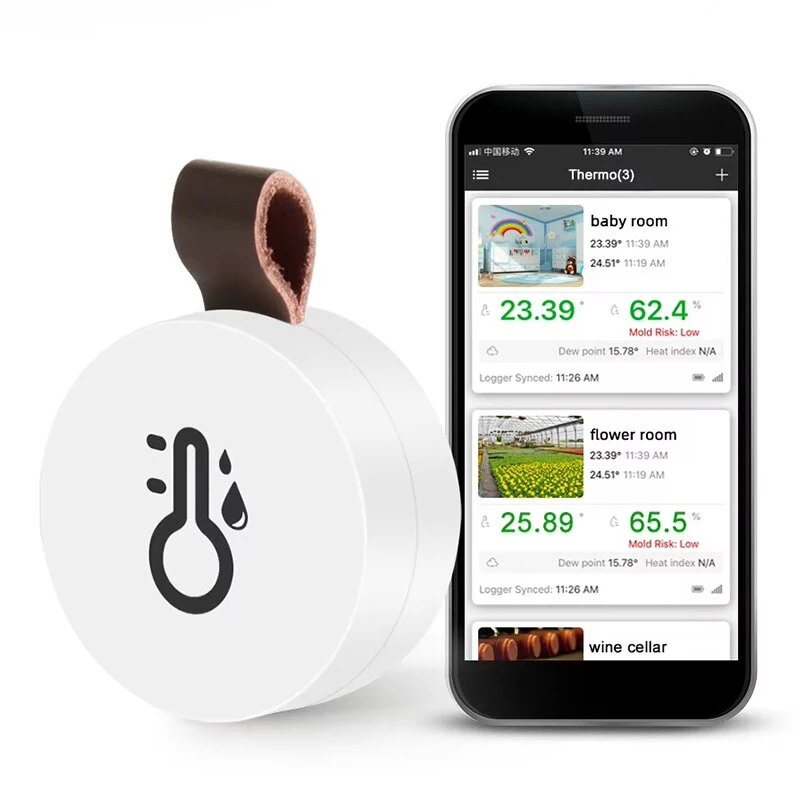
1. 【Wireless App Control】You can connect the APP through bluetooth, upload the data to the APP, and generate a curve in the APP, so that you can intuitively understand the temperature and humidity changes, and protect the health of your family.
2. 【Temperature and Humidity Alarm】You can set the alarm temperature or humidity. If the temperature or humidity exceeds the set range, the value will be displayed in red and an alarm will be issued on the device
3. 【Historical memory time】 The product has a built-in storage function, which records temperature and humidity data every 10 minutes, and can export CSV files and share them with friends
4,【Small and convenient】Only the same size as a coin, easy to carry and does not take up too much storage space Top carry design, you can hang it on the wall hook
5, 【MEMS sensor】Using MEMS digital temperature and humidity sensor, with stable and accurate measurement, and a refresh rate of 1 second/time
Package Include:
1 x Host
1 x Pin
1 x English Manual


