
1 / 8 · Click to enlarge
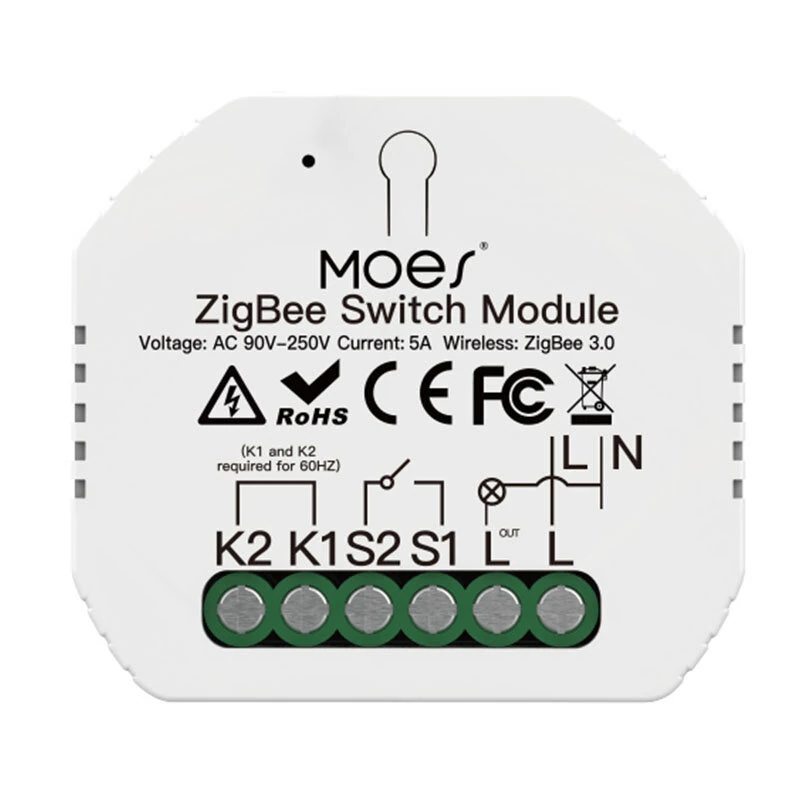
Tuya Zigbe 1-Way Switch Module 90-250V AC 5A Single Fire Wire Smart Light Switch Tuya App Remote Control Timer Schedule Works with Alexa Google Assistant Zigbe Hub Required
The Tuya Zigbe 1-Way Switch Module 90-250V AC 5A Single Fire Wire Smart Light Switch Tuya App Remote Control Timer Schedule Works with Alexa Google Assistant Zigbe Hub Required is a mid-range product designed for everyday users.
Available Offers
Free Delivery on this order. No minimum order value.
15-Day Easy Returns — hassle-free return & full refund.
Secure Payment — 100% safe checkout with UPI, Cards & Net Banking.
Type: WIFI
Available Offers
5% Cashback
Pay with UPI & get 5% cashback (up to ₹50) via Razorpay
No-Cost EMI
Available on select bank cards at checkout. 0% interest for 3 months.
Free Shipping
Free delivery on all orders. No minimum order value.
Cash on Delivery
COD available on orders up to ₹5,000 across India.
Ideal For
About This Product
The Tuya Zigbe 1-Way Switch Module 90-250V AC 5A Single Fire Wire Smart Light Switch Tuya App Remote Control Timer Schedule Works with Alexa Google Assistant Zigbe Hub Required is a mid-range designed for everyday users. It delivers reliable performance at an accessible price.
Why Buy from Pricio?
Pricio sources this product directly, cutting out multiple middlemen. Every order includes free shipping, a 15-day return policy, and secure payment via Razorpay.
Specifications:
Product Type: 1-way ZigBe Switch Module
Voltage: 90-250V AC
Current: 5A
Wireless Protocol: ZigBee3.0
Operation Temp: -10°C-+40°C
Case Temp.: Tc: +80°C(Max.))
Operation Range: ≤200m
Dims(WxDxH): 52x47x18 mm
IP Rating: IP20
Features:
1. Mini Body Design: Its compact size allows it to be easily hidden inside a standard wall switch box, upgrading your existing switch to a smart one without changing your home's appearance.
2. App Remote Control: Control your home lighting from anywhere in the world using the Smart Life/Tuya app on your smartphone. Never worry about leaving the lights on again.
3. Hands-Free Voice Control: Connects seamlessly with Amazon Alexa and Google Assistant, allowing you to turn lights on or off with simple voice commands for ultimate convenience.
4. Versatile 2-Way Control: This module works with both standard 1-way circuits and 2-way circuits (controlling one light from two switches), making it suitable for staircases and large rooms.
5. Power-Off Memory Function: Customize the relay status in the app. Choose whether the light should be ON, OFF, or return to its last state after a power outage.
6. Timer and Schedule Automation: Set up customized schedules or countdown timers to automatically manage your lights, helping you save energy and simplify your daily routine.
Package Include:
1x 1-way ZigBe Switch Module


