
1 / 6 · Click to enlarge
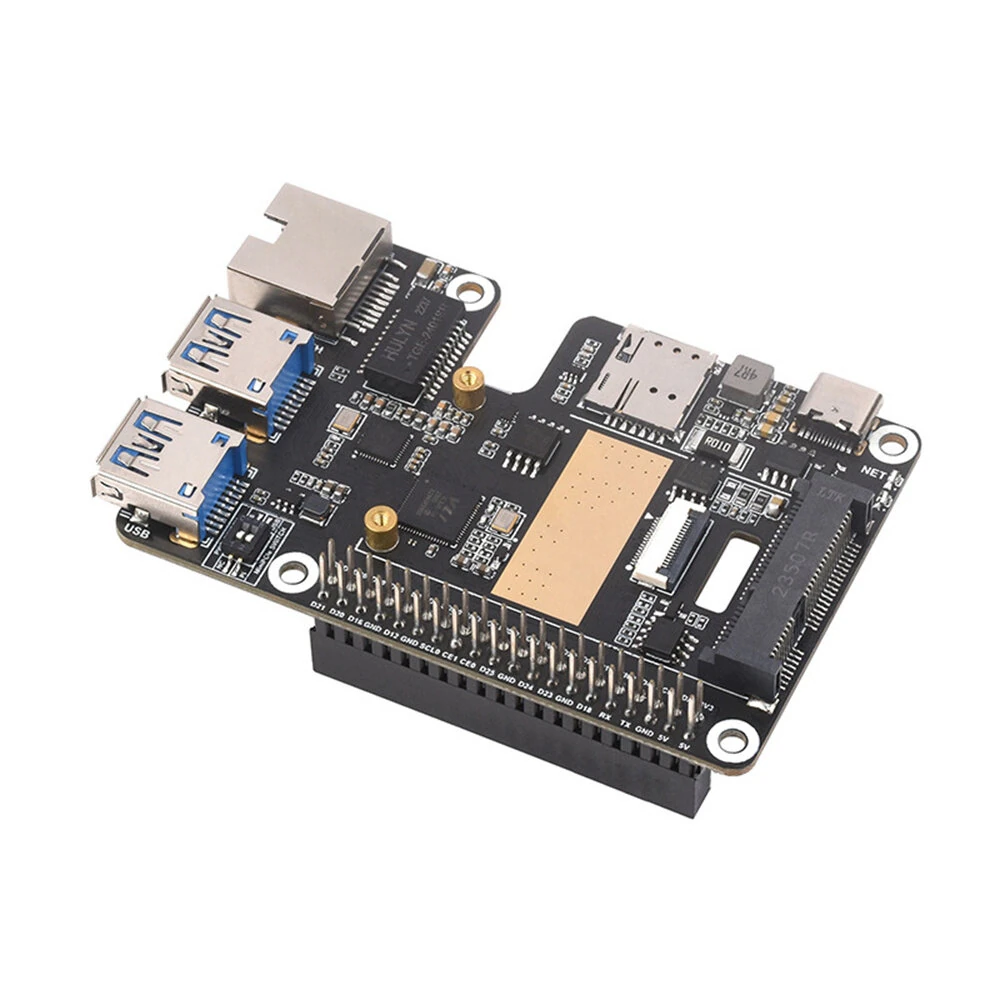
Raspberry Pi 5 PCIe Expansion Board to MiniPCIe 4G Gigabit Ethernet USB 3.2 Gen1 Adapter Board
The Raspberry Pi 5 PCIe Expansion Board to MiniPCIe 4G Gigabit Ethernet USB 3.2 Gen1 Adapter Board is a mid-range product designed for everyday users.
Available Offers
Free Delivery on this order. No minimum order value.
15-Day Easy Returns — hassle-free return & full refund.
Secure Payment — 100% safe checkout with UPI, Cards & Net Banking.
Price: ₹3,457
Available Offers
5% Cashback
Pay with UPI & get 5% cashback (up to ₹50) via Razorpay
No-Cost EMI
Available on select bank cards at checkout. 0% interest for 3 months.
Free Shipping
Free delivery on all orders. No minimum order value.
Cash on Delivery
COD available on orders up to ₹5,000 across India.
Ideal For
About This Product
The Raspberry Pi 5 PCIe Expansion Board to MiniPCIe 4G Gigabit Ethernet USB 3.2 Gen1 Adapter Board is a mid-range designed for everyday users. It delivers reliable performance at an accessible price.
Why Buy from Pricio?
Pricio sources this product directly, cutting out multiple middlemen. Every order includes free shipping, a 15-day return policy, and secure payment via Razorpay.
Product Name: PCIe to MiniPCIe/Gigabit Ethernet/USB 3.2 Gen1 HAT
Compatibility: Raspberry Pi 5
Slots and Ports:
MiniPCIe slot
PCIe interface via 16PIN cable
USB 3.2 Gen1 ports
Gigabit Ethernet port with RTL8153B chip
Supported Modules: SIM7600G-H-PCIE / EG25-G-mPCIe series 4G modules
Network Speeds:
LTE Cat-4: Up to 50Mbps (uplink) / Up to 150Mbps (downlink)
3G (HSPA+): Up to 5.76Mbps (uplink) / Up to 42Mbps (downlink)
2G (GPRS/EDGE): Up to 236.8Kbps (uplink) / Up to 236.8Kbps (downlink)
Positioning Systems Supported: GPS, BeiDou, Glonass, GALILEO, QZSS, LBS base station
Operating Systems: Raspberry Pi OS, Ubuntu, OpenWRT
Power Control: USB port power control via software
Features:
1. Enhanced Compatibility: Designed specifically for Raspberry Pi 5, this HAT seamlessly integrates with the board through a 16PIN PCIe interface cable, bringing high versatility to your Raspberry Pi projects.
2. High-Performance Networking: Equipped with the RTL8153B Gigabit Ethernet chip, this HAT ensures robust and high-speed network connectivity. The sinking design of the network port not only provides structural elegance but also optimizes heat dissipation.
3. Versatile Connectivity: The onboard MiniPCIe slot is compatible with SIM7600G-H-PCIE and EG25-G-mPCIe series 4G modules, allowing you to easily upgrade your networking capabilities. Additionally, the USB 3.2 Gen1 ports enable high-speed data transfers.
4. Extensive OS Support: Enjoy the flexibility of using multiple operating systems including Raspberry Pi OS, Ubuntu, and OpenWRT. This broad OS compatibility ensures stable and reliable performance across different platforms.
5. Integrated Positioning Systems: Benefits from multi GPS, BeiDou, Glonass, GALILEO, QZSS, and LBS base station positioning support. This comprehensive positioning capability ensures precise and reliable geolocation data for your projects.
Package Included:
Tpye 1:
1 x PCIe Expansion Board
1 Set x Accessories
Tpye 2:
1 x PCIe Expansion Board
1 x SIM7600G-H-PCIE
1 Set x Accessories
Tpye 3:
1 x PCIe Expansion Board
1 x EG25-G mPCIe
1 Set x Accessories


