
1 / 6 · Click to enlarge
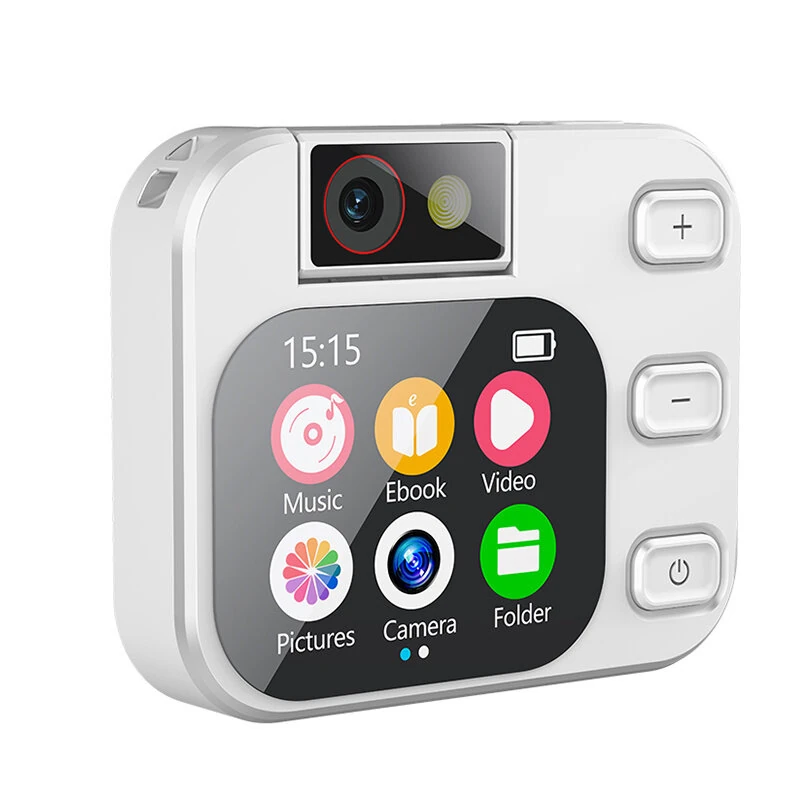
Portable MP3 Player with 180° Rotating Camera bluetooth Touch Screen Music Player Digital Camera Ebook Pocket Size Media Player
The Portable MP3 Player with 180° Rotating Camera bluetooth Touch Screen Music Player Digital Camera Ebook Pocket Size Media Player is a mid-range product designed for everyday users.
Available Offers
Free Delivery on this order. No minimum order value.
15-Day Easy Returns — hassle-free return & full refund.
Secure Payment — 100% safe checkout with UPI, Cards & Net Banking.
49% Off — you save ₹4,631 on this product!
Color: White
Available Offers
5% Cashback
Pay with UPI & get 5% cashback (up to ₹50) via Razorpay
No-Cost EMI
Available on select bank cards at checkout. 0% interest for 3 months.
Free Shipping
Free delivery on all orders. No minimum order value.
Cash on Delivery
COD available on orders up to ₹5,000 across India.
Ideal For
About This Product
The Portable MP3 Player with 180° Rotating Camera bluetooth Touch Screen Music Player Digital Camera Ebook Pocket Size Media Player is a mid-range designed for everyday users. It delivers reliable performance at an accessible price.
Why Buy from Pricio?
Pricio sources this product directly, cutting out multiple middlemen. Every order includes free shipping, a 15-day return policy, and secure payment via Razorpay.
Specifications:
Product Name: Mini Touch Screen Media Player with HD Camera
Display: Full- Screen
Camera: HD Lens with LED Fill Light, 180° Rotating Function
Connectivity: bluetooth, Type-C USB Port, 3.5mm Earphone Jack
Storage: External TF Card Slot (Card not included)
Controls: Touch Screen Interface + Physical Buttons (Power, Volume +/-, Photo)
Audio: Built-in Speaker, Microphone with Noise Reduction, HiFi Audio Playback
Dimensions: 66mm x 54mm
Features:
1. 180° Rotating HD Camera: Freely adjust the camera angle to capture photos and videos from the front, back, or any angle in between. Perfect for selfies, vlogging, and creative shots.
2. All-in-One Entertainment Hub: More than just a camera, this device is a complete media player. Listen to music, watch videos, read e-books, and browse your picture gallery on the vivid color screen.
3. Intuitive Touch Screen Operation: Features a responsive touch screen for smooth navigation through menus and functions, complemented by easy-to-use physical buttons for core operations.
4. Compact and Portable Design: With its pocket-sized body, this device is designed to be carried anywhere, making it an ideal companion for kids, teens, and anyone on the go.
5. Advanced Study and Language Tools: A perfect helper for learning. Use the electronic dictionary, A-B repeat function for language practice, and clear audio recording for notes.
6. bluetooth Connectivity: Easily connect to your wireless headphones or speakers for a private and high-quality listening experience without the hassle of cables.
Package Includes:
1 x Multifunctional Media Player
Not included the TF Card.


