
1 / 7 · Click to enlarge
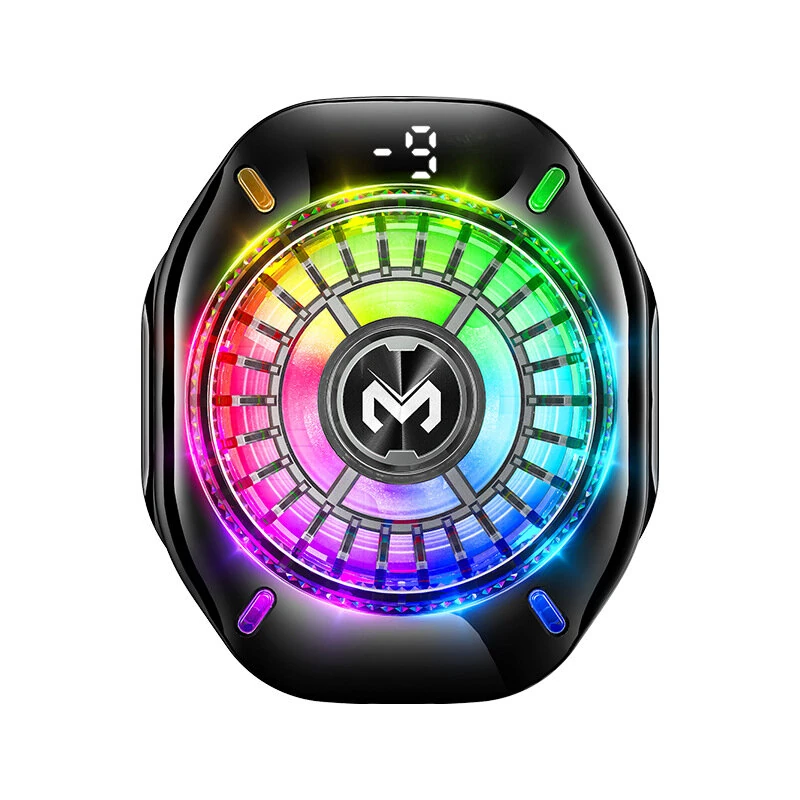
MEMO CX10 Magnetic Phone Cooler Semiconductor Cooling AI Temp Control RGB Lights Digital Display Gaming Radiator
The MEMO CX10 Magnetic Phone Cooler Semiconductor Cooling AI Temp Control RGB Lights Digital Display Gaming Radiator is a mid-range product designed for gamers and content creators.
Available Offers
Free Delivery on this order. No minimum order value.
15-Day Easy Returns — hassle-free return & full refund.
Secure Payment — 100% safe checkout with UPI, Cards & Net Banking.
15% Off — you save ₹567 on this product!
Color.: Black
Available Offers
5% Cashback
Pay with UPI & get 5% cashback (up to ₹50) via Razorpay
No-Cost EMI
Available on select bank cards at checkout. 0% interest for 3 months.
Free Shipping
Free delivery on all orders. No minimum order value.
Cash on Delivery
COD available on orders up to ₹5,000 across India.
Ideal For
About This Product
The MEMO CX10 Magnetic Phone Cooler Semiconductor Cooling AI Temp Control RGB Lights Digital Display Gaming Radiator is a mid-range designed for gamers and content creators. It delivers reliable performance at an accessible price.
Why Buy from Pricio?
Pricio sources this product directly, cutting out multiple middlemen. Every order includes free shipping, a 15-day return policy, and secure payment via Razorpay.
Specification:
Brand: MEMO
Model: CX10
Color: Black
Power Input: 5V/2A
Charging Port: Type-C
Compatibility: Universal for phones and tablets with a flat back surface
Product Weight: 72.5g
Dimensions: 58mm x 117.5mm x 36mm
Features:
1. High-Power Semiconductor Cooling: Utilizes advanced TEC refrigeration technology for rapid and significant temperature reduction, combating phone overheating during intense use.
2. Dual-Mode Design (Magnetic + Clip-On): Offers versatile attachment options. Use the strong magnetic suction for compatible devices or the included clips for universal fitting on any smartphone.
3. AI Intelligent Temperature Control: The built-in AI chip and NTC sensor scientifically manage the cooling level to prevent over-cooling and condensation, safeguarding your device's internal components.
4. Integrated Digital Temperature Display: A clear digital screen shows the real-time contact surface temperature, allowing you to see the powerful cooling performance in action.
5. Stunning RGB Lighting Effects: Features a vibrant, multi-color RGB light ring that creates an immersive gaming atmosphere and a striking visual look.
6. Ultra-Lightweight & Low-Noise Fan: Engineered to be extremely light at only 72.5g to avoid wrist strain, while the quiet fan ensures your gaming audio and voice chat remain clear and uninterrupted.
Package Include:
1 x CX10 Phone Cooler
1 x Type-C Charging Cable
1 x Magnetic Sheet
2 x Spring Clips
1 x Manual
1 x Package Box


