
Free Delivery  ·  COD Available  ·  15-Day Returns
Pricio
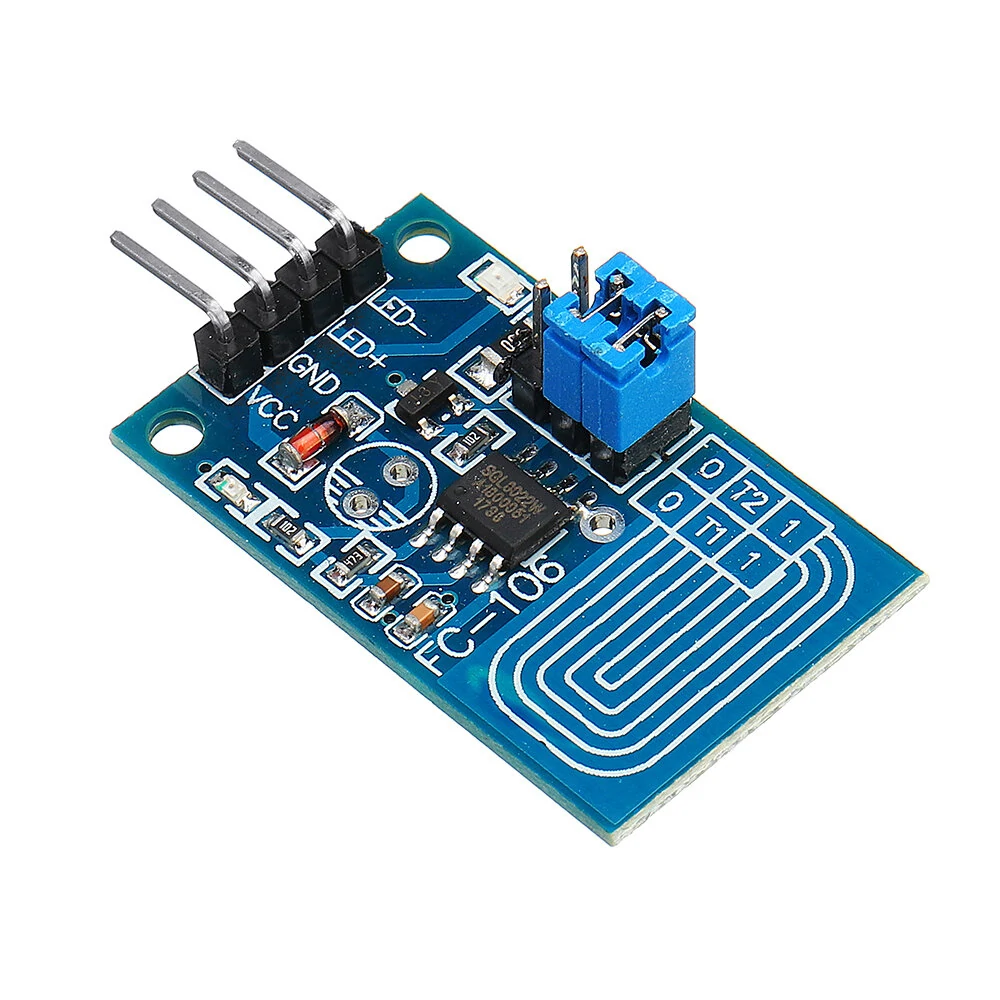
LED Dimmer Switch Module Capacitive Touch Dimmer Constant Pressure Stepless Dimm — image 1
Hover to zoom

1 / 11 · Click to enlarge

LED Dimmer Switch Module Capacitive Touch Dimmer Constant Pressure Stepless Dimm

5.06 ratings
641+ bought in past month
AI Summary
product for everyday users

The LED Dimmer Switch Module Capacitive Touch Dimmer Constant Pressure Stepless Dimm is a value-for-money product designed for everyday users. 100% of buyers rate it 4★ or above.

₹500
Free Shipping💵 COD Available

Available Offers

Free Delivery on this order. No minimum order value.

15-Day Easy Returns — hassle-free return & full refund.

Secure Payment — 100% safe checkout with UPI, Cards & Net Banking.

Total: ₹500
Buying tip: A smart budget buy — solid performance without breaking the bank.
Estimated delivery: 21 Aug4 Sept
Free Shipping
Pan India delivery
15-Day Returns
Hassle-free policy
Secure Payment
Razorpay protected
Quality Assured
Vetted products only

Available Offers

💳

5% Cashback

Pay with UPI & get 5% cashback (up to ₹50) via Razorpay

🏦

No-Cost EMI

Available on select bank cards at checkout. 0% interest for 3 months.

📦

Free Shipping

Free delivery on all orders. No minimum order value.

💵

Cash on Delivery

COD available on orders up to ₹5,000 across India.

Ideal For

Everyday convenience
Share:
SKU: bg-1373149

About This Product

The LED Dimmer Switch Module Capacitive Touch Dimmer Constant Pressure Stepless Dimm is a value-for-money designed for everyday users. It delivers reliable performance at an accessible price.

Customer Verdict

100% of buyers rated this product 4 stars or above.

Why Buy from Pricio?

Pricio sources this product directly, cutting out multiple middlemen. Every order includes free shipping, a 15-day return policy, and secure payment via Razorpay.

Features:
 
- Single touch,using the principle of capacitance touch .The default function is switch,dimming,with brightness memories LED touch dimming.It will light slowly when turn on the lights,and become dark slowly when turn off,which effectively avoid the stimulation to eyes.
- The lamp brightness can be adjusted by requirement,it is very to operate.
- It can touch in medium protection,such glass,acrylic,plastic,ceramics and so on,which is very safe.
- Wide application of voltage range,you can choose arbitrarily between 2.4V to 4.5V.
- Simple applied circuit,less peripheral devices, easy processing, low cost.
- Anti power and phone interference,the can reach above +/-2KV;the touch response sensitivity and reliability will not affected by the close distance or multi-angle mobile phone interference.
- Needn't to touch copper foil directly,the dimming can be processed across acrylic glass(above 3mm) or plastic.
- It can control LED module,light and so on.It is available for indoor LED,lighting lamp,DIY automotive lights dimming refit.
 
Usage:
 
- Click touch(touch duration time is less than 550ms) can control the lamp.Click once, the lamp lights;click again,the lamp off.The initial brightness of lights lit the fixed for the whole brightness of 90%.
- Press the touch at long time (touch duration time is more than 550ms), you can achieve stepless dimming the lights. Press long time once, light levels gradually increase light levels when released after the release time parked in the corresponding brightness, long time if more than three seconds, the light levels to achieve maximum brightness does not change; again long press touch, light levels gradually decreased to stop when you release the light levels in the corresponding brightness release time, if a long time more than three seconds, the light levels after reaching the minimum brightness does not change.
 
Package Included:
 
1x Capacitive Touch Dimmer Switch Module


Product Safety Information

Setup Guide

1
Identify the pins
Locate VCC (power), GND (ground), and data pins (SDA/SCL for I2C, MOSI/MISO for SPI, or TX/RX for UART). Refer to the pinout diagram on the product page.
2
Wire to your microcontroller
Connect VCC to 3.3V or 5V (check the module spec), GND to GND, and data pins to the appropriate GPIO pins on your Arduino or Raspberry Pi.
3
Install libraries
In Arduino IDE, go to Sketch → Include Library → Manage Libraries and search for the sensor library. Install the recommended version.
4
Upload example sketch
Open File → Examples → [library name] → Basic Example. Upload to your board and open Serial Monitor to view output.
5
Calibrate if needed
Some sensors (temperature, humidity, distance) may need a short warm-up period or calibration. Run the calibration sketch if provided.