
1 / 7 · Click to enlarge
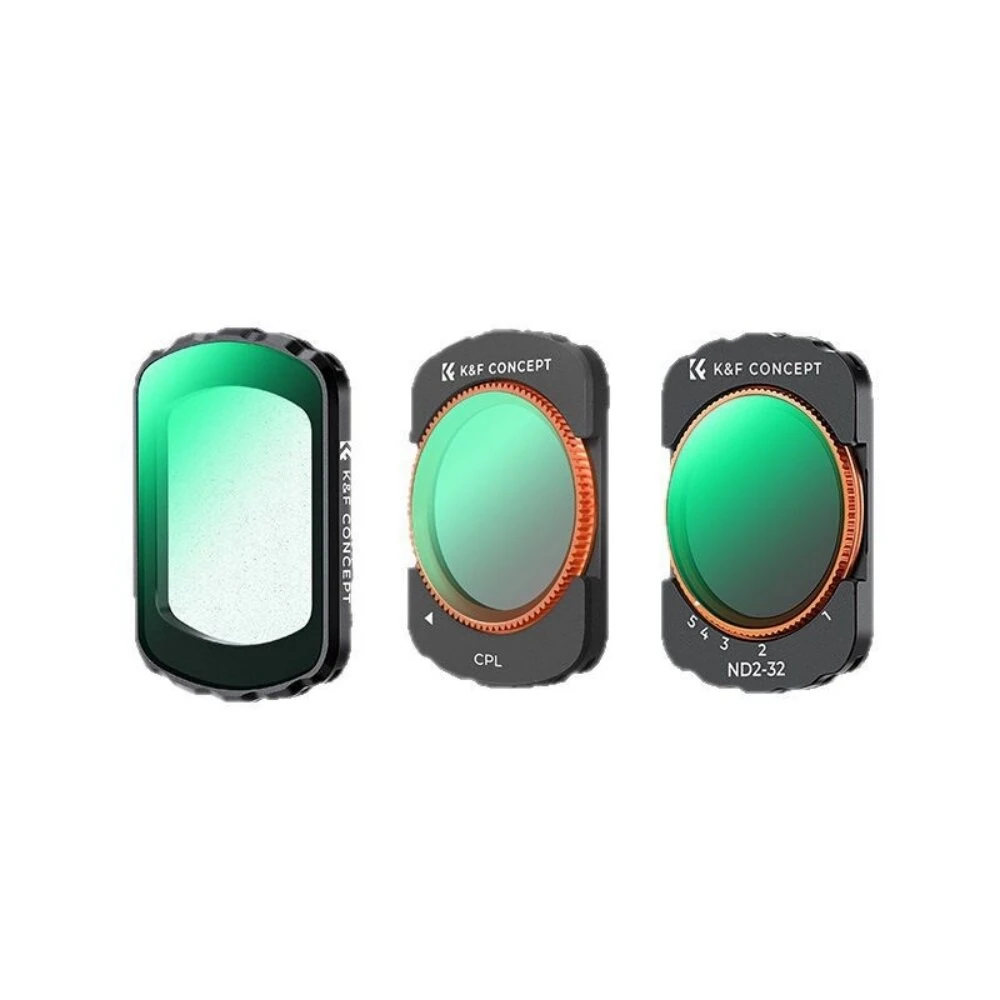
K&F Concept 3-In-1 Filter Kit 28-Layer Nano Coating ND2-32 CPL MCUV Camera Lens Filters Compatible with DJI Osmo Pocket 3 Camera
The K&F Concept 3-In-1 Filter Kit 28-Layer Nano Coating ND2-32 CPL MCUV Camera Lens Filters Compatible with DJI Osmo Pocket 3 Camera is a mid-range product designed for everyday users.
Available Offers
Free Delivery on this order. No minimum order value.
15-Day Easy Returns — hassle-free return & full refund.
Secure Payment — 100% safe checkout with UPI, Cards & Net Banking.
26% Off — you save ₹1,478 on this product!
Type: 1 set
Available Offers
5% Cashback
Pay with UPI & get 5% cashback (up to ₹50) via Razorpay
No-Cost EMI
Available on select bank cards at checkout. 0% interest for 3 months.
Free Shipping
Free delivery on all orders. No minimum order value.
Cash on Delivery
COD available on orders up to ₹5,000 across India.
Ideal For
About This Product
The K&F Concept 3-In-1 Filter Kit 28-Layer Nano Coating ND2-32 CPL MCUV Camera Lens Filters Compatible with DJI Osmo Pocket 3 Camera is a mid-range designed for everyday users. It delivers reliable performance at an accessible price.
Why Buy from Pricio?
Pricio sources this product directly, cutting out multiple middlemen. Every order includes free shipping, a 15-day return policy, and secure payment via Razorpay.
Specification:
Item Name: K&F Concept 3-in-1 Filter Kit (Black Soft + CPL + Variable ND2–32)
Compatibility: DJI Osmo Pocket 3 camera
Filter Types: 1/4 Black Soft diffusion, Circular Polarizer (CPL), Variable ND2–32
Material: HD optical glass + aviation-grade aluminum frame
Coating: 28-layer nanometer multi-coating (0.2% ultra-low reflectivity)
Mounting Method: Built-in magnetic attachment
Design: Ultra‑thin frame, gimbal-safe, supports camera power on/off and lock-in without interference
Color: Black frame with copper-colored ring (CPL & ND)
Features:
1. Strong Magnetic Mounting: design allows quick, secure installation and removal without tools, ideal for fast shooting changes.
2. Thin, Gimbal-Safe Frame: Slim profile prevents vignetting and lets the Osmo Pocket 3 calibrate, power on/off and lock in normally.
3. 28-Layer Nano Coating: Multi-coated optical glass offers anti-reflection, anti-glare, waterproof and oil-resistant performance while keeping image clarity.
4. Variable ND2–32 Filter: Stepless light reduction from 1 to 5 stops to control shutter speed in bright scenes and create smooth motion in video.
5. CPL Polarizing Filter: Cuts unwanted reflections from water, glass and metal surfaces, improving color saturation and sky contrast.
6. 1/4 Black Soft Filter: Gently lowers contrast, softens highlights and creates a cinematic, dreamy look for portraits and video.
Package Includes:
1 x 1/4 Black Soft Filter
1 x CPL Filter
1 x Variable ND2–32 Filter


