
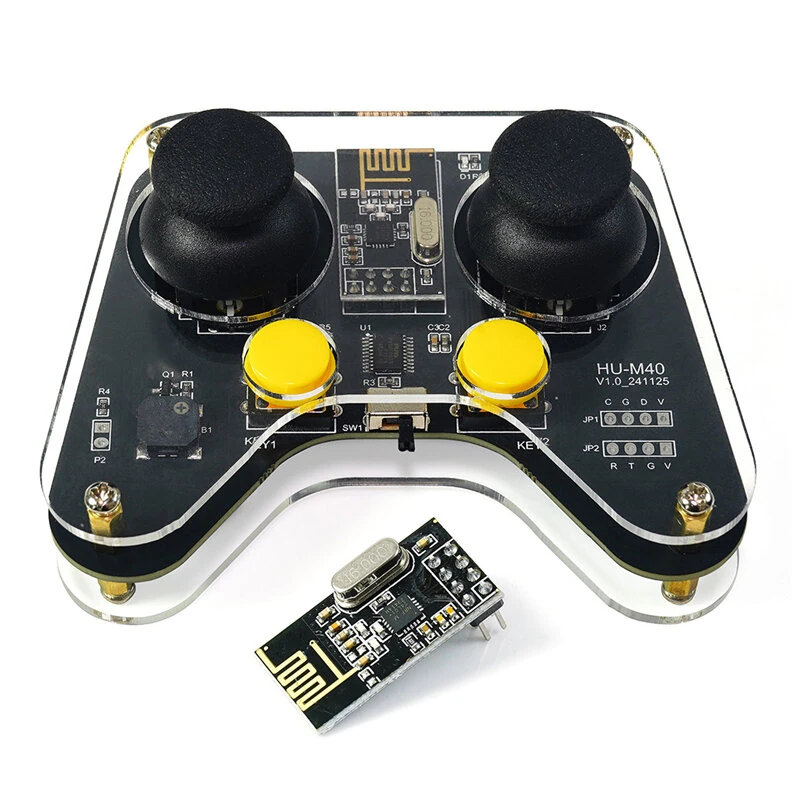
HU-M40 24GHz Wireless Remote Controller Dual Joystick 250kbps NRF24L01P Communication Module Low Power Consumption Open Protocol
The HU-M40 24GHz Wireless Remote Controller Dual Joystick 250kbps NRF24L01P Communication Module Low Power Consumption Open Protocol is a value-for-money product designed for everyday users.
Available Offers
Free Delivery on this order. No minimum order value.
15-Day Easy Returns — hassle-free return & full refund.
Secure Payment — 100% safe checkout with UPI, Cards & Net Banking.
Available Offers
5% Cashback
Pay with UPI & get 5% cashback (up to ₹50) via Razorpay
No-Cost EMI
Available on select bank cards at checkout. 0% interest for 3 months.
Free Shipping
Free delivery on all orders. No minimum order value.
Cash on Delivery
COD available on orders up to ₹5,000 across India.
Ideal For
About This Product
The HU-M40 24GHz Wireless Remote Controller Dual Joystick 250kbps NRF24L01P Communication Module Low Power Consumption Open Protocol is a value-for-money designed for everyday users. It delivers reliable performance at an accessible price.
Why Buy from Pricio?
Pricio sources this product directly, cutting out multiple middlemen. Every order includes free shipping, a 15-day return policy, and secure payment via Razorpay.
Product Name: HU-M40 2.4G Wireless Remote Controller
Working Voltage: DC 1.9V - 3.6V
Working Current: 5mA@3V
Standby Current: 8uA@3V
Communication Chip: NRF24L01P
Wireless Speed: 250kbps
Frequency: 2.4GHz, CH25
Transmission Distance: 8 meters
Power Supply: 2 x AAA Batteries(not included)
Transmission Power: 11.3mA@0db
Dimensions: Circuit Board: 98mm x 75mm
Weight: 79g
Features:
1. Stable 2.4G Wireless Communication
Featuring NRF24L01P module, the device ensures smooth and reliable connectivity for uninterrupted remote control operations.
2. Self-Pairing Functionality
The automatic pairing mechanism avoids interference caused by multiple controllers operating simultaneously — perfect for group robotics projects.
3. Dual Joystick and Six Physical Buttons
Equipped with dual analog joysticks and six tactile buttons, offering enhanced control for managing various robot functions and mechanical arm movements.
4. Energy-Saving Design
Designed with auto sleep functionality, preserving battery life during inactivity and enabling sustained usage over longer durations.
5. Open Communication Protocols
Supports flexible integration with development platforms such as Arduinos UNOs R3, STM32 microcontrollers, and 51 single-chip systems.
Package Included:
1 x HU-M40 2.4G Wireless Remote Controller
1 x NRF24L01P Wireless Communication Module
Note: Battery is not included.


