
1 / 6 · Click to enlarge
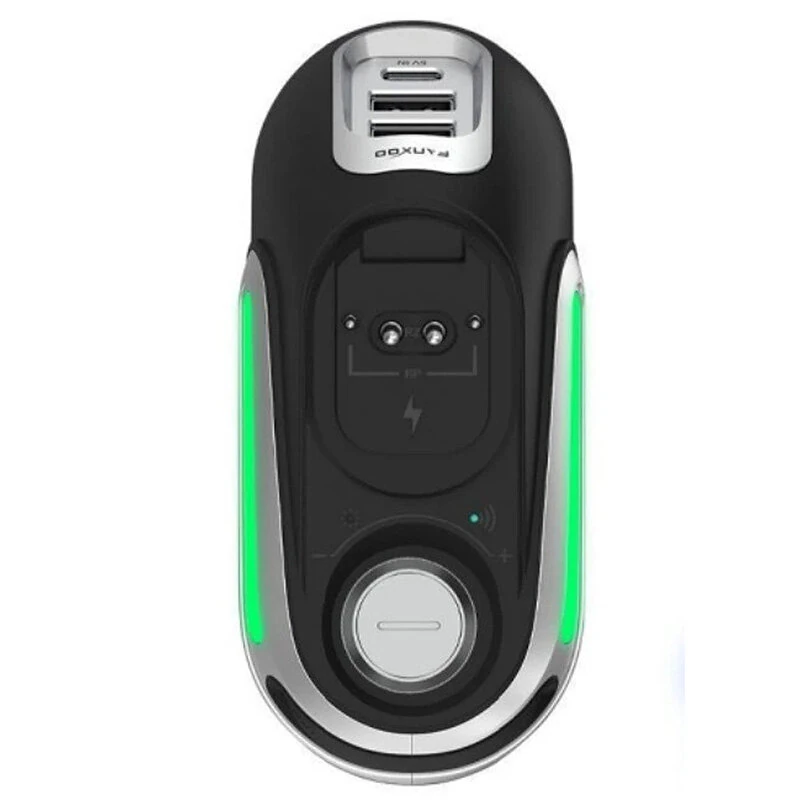
FURYCUBE R-Power Magnetic Mouse Charging Dock for Razers Mouse Wireless Charging Base RGB Lighting Volume Knob USB Hub Compatible with Raser Series Wireless Mouse
The FURYCUBE R-Power Magnetic Mouse Charging Dock for Razers Mouse Wireless Charging Base RGB Lighting Volume Knob USB Hub Compatible with Raser Series Wireless Mouse is a mid-range product designed for everyday users.
Available Offers
Free Delivery on this order. No minimum order value.
15-Day Easy Returns — hassle-free return & full refund.
Secure Payment — 100% safe checkout with UPI, Cards & Net Banking.
Price: ₹3,654
Available Offers
5% Cashback
Pay with UPI & get 5% cashback (up to ₹50) via Razorpay
No-Cost EMI
Available on select bank cards at checkout. 0% interest for 3 months.
Free Shipping
Free delivery on all orders. No minimum order value.
Cash on Delivery
COD available on orders up to ₹5,000 across India.
Ideal For
About This Product
The FURYCUBE R-Power Magnetic Mouse Charging Dock for Razers Mouse Wireless Charging Base RGB Lighting Volume Knob USB Hub Compatible with Raser Series Wireless Mouse is a mid-range designed for everyday users. It delivers reliable performance at an accessible price.
Why Buy from Pricio?
Pricio sources this product directly, cutting out multiple middlemen. Every order includes free shipping, a 15-day return policy, and secure payment via Razorpay.
Specifications:
Brand: FURYCUBE
Product Name: R-Power Mouse Wireless Charging Base
Input / Output: 5V / 1A
Battery Capacity: None
Charging Method: Magnetic Contact
USB Expansion: 2x USB 2.0 Ports
Materials: Engineering Plastic + Aluminum Alloy
Dimensions: 122 x 56 x 57 mm
Weight: 120g
Compatible Models: Razers Series
Please Note: This dock is NOT compatible with Razers Vipers V2 Pro or DeathAdder V3 Pro.
Features:
1. Effortless Magnetic Charging: Simply place your compatible mouse on the dock; strong magnets guide it into place for a stable and immediate charging connection.
2. Multi-Function Control Knob: A premium metal knob gives you instant control over your PC's system volume and screen brightness (brightness control for laptops and all-in-one PCs only).
3. Dynamic RGB Lighting: Illuminate your gaming station with a vibrant, gradient RGB light strip. You can easily turn the lighting on or off with a long press of the control knob.
4. Built-in USB Hub: Expand your PC's connectivity with two convenient USB 2.0 ports, perfect for your mouse dongle or other peripherals.
5. Visual Power Level: See your mouse's charge status at a glance through Razers's Synapses software and the dock's indicator light.
Package Include:
1 x R-Power Charging Dock(Mouse not included)
1 x 1-Meter Data Cable
1 x User Manual


