
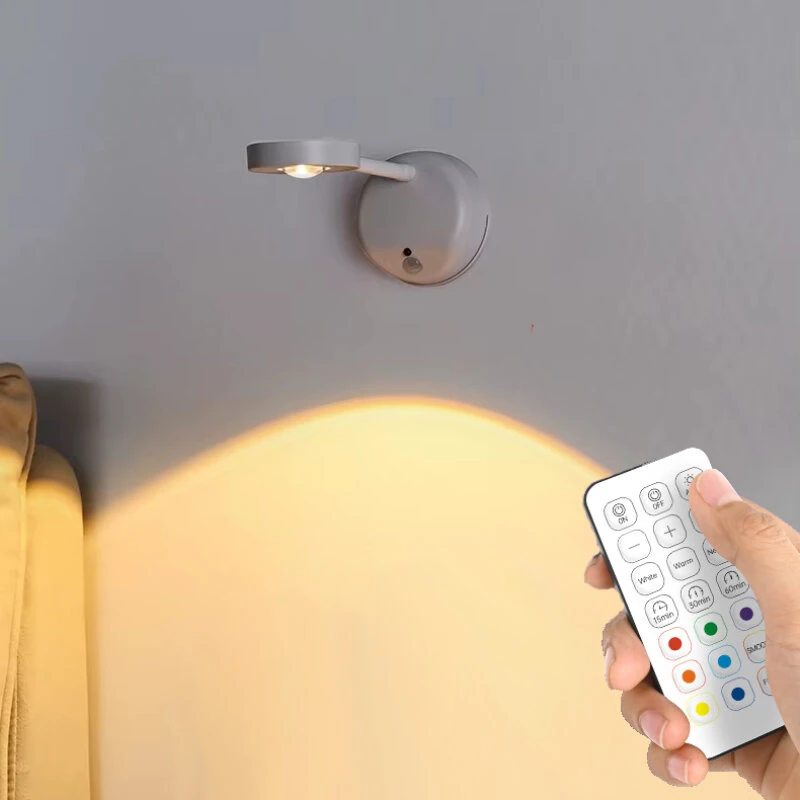
Elfeland Rechargeable LED RGB Motion Sensor Spotlight Timer Smart PIR Sensor Wall Lamp with Remote Control
The Elfeland Rechargeable LED RGB Motion Sensor Spotlight Timer Smart PIR Sensor Wall Lamp with Remote Control is a mid-range product designed for everyday users.
Available Offers
Free Delivery on this order. No minimum order value.
15-Day Easy Returns — hassle-free return & full refund.
Secure Payment — 100% safe checkout with UPI, Cards & Net Banking.
32% Off — you save ₹1,127 on this product!
Available Offers
5% Cashback
Pay with UPI & get 5% cashback (up to ₹50) via Razorpay
No-Cost EMI
Available on select bank cards at checkout. 0% interest for 3 months.
Free Shipping
Free delivery on all orders. No minimum order value.
Cash on Delivery
COD available on orders up to ₹5,000 across India.
Ideal For
About This Product
The Elfeland Rechargeable LED RGB Motion Sensor Spotlight Timer Smart PIR Sensor Wall Lamp with Remote Control is a mid-range designed for everyday users. It delivers reliable performance at an accessible price.
Why Buy from Pricio?
Pricio sources this product directly, cutting out multiple middlemen. Every order includes free shipping, a 15-day return policy, and secure payment via Razorpay.
Specification:
Color Options: Black / White
Material: ABS + PC
Light Source: LED
Light Color: Warm, Neutral, White Light & RGB
Sensing Type: PIR motion sensor, 120° angel, range ≤ 7 m
Working Modes: Always-on; Night sensing; All‑day sensing
Control Method: Button Control, Remote Control
Brightness: Stepless dimming (touch or remote)
Timer (remote version): 5 / 15 / 30 minutes auto‑off
Charging Port: Type‑C
Charging Time: About 3 hours
Battery Capacity: 2000mAh
Battery Life: Up to about 43 days in sensing mode (10 activations/day, for reference)
Installation: Wall‑mounted (adhesive pad or screws) / free‑standing on table
Lamp Size: Height 188 mm; base diameter 82 mm
Features:
- 3 lighting colors + RGB effects – switch among warm, neutral and white light; RGB model adds colorful ambient modes for artwork, bedrooms and parties.
- Smart motion sensing – PIR sensor turns the light on automatically within 7 m and 120°, then switches off about 25 seconds after you leave.
- Three intelligent working modes – choose always‑on, night‑only sensing, or all‑day sensing to match hallways, bedrooms, stairs and more.
- Flexible angle & dual‑use design – rotatable lamp head lets you aim the beam precisely; can be placed on a table or snapped onto the wall base.
- Wireless, rechargeable lighting – built‑in battery with Type‑C fast charging; no wiring needed, perfect for rental homes and quick upgrades.
- Remote version extra functions – one remote controls multiple lamps, timer off (5/15/30 min), quick color change, brightness up/down and RGB scene selection.
Package Included:
1 x RGB Wall Spotlight
1 x Remote Control


