
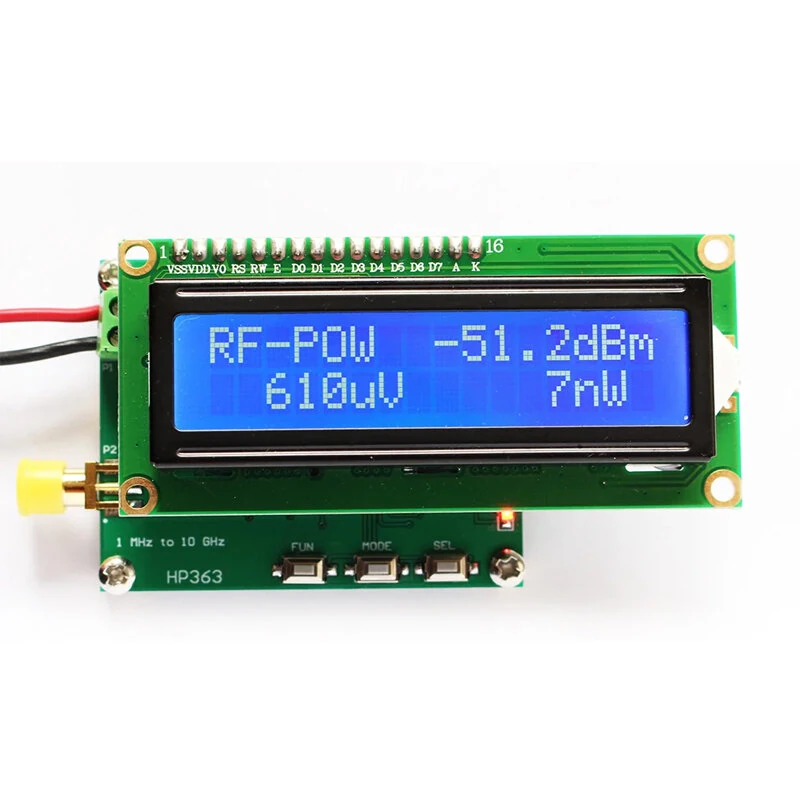
Digital RF Power Meter 1MHz to 10GHz -50 to 0dBm RF Signal Measuring Meter Module
5.04 ratingsThe Digital RF Power Meter 1MHz to 10GHz -50 to 0dBm RF Signal Measuring Meter Module is a mid-range product designed for everyday users. Customers praise its accurate and reliable.
Available Offers
Free Delivery on this order. No minimum order value.
15-Day Easy Returns — hassle-free return & full refund.
Secure Payment — 100% safe checkout with UPI, Cards & Net Banking.
38% Off — you save ₹1,382 on this product!
Available Offers
5% Cashback
Pay with UPI & get 5% cashback (up to ₹50) via Razorpay
No-Cost EMI
Available on select bank cards at checkout. 0% interest for 3 months.
Free Shipping
Free delivery on all orders. No minimum order value.
Cash on Delivery
COD available on orders up to ₹5,000 across India.
Ideal For
About This Product
The Digital RF Power Meter 1MHz to 10GHz -50 to 0dBm RF Signal Measuring Meter Module is a mid-range designed for everyday users. Customers highlight its accurate and reliable.
Why Buy from Pricio?
Pricio sources this product directly, cutting out multiple middlemen. Every order includes free shipping, a 15-day return policy, and secure payment via Razorpay.
Specification:
Power measuring range: -50~+0 dBm (adding RF attenuator can expand to 100dBm)
Power measurement accuracy: 0.1dBm
Frequency measuring range: 1MHz~10000 MHz
Power measuring range: 1nW~1mW
Operating power supply: 7-12VDC
Operating current: <50 mA
Operating temperature: -10℃~55℃
Storage temperature: -20℃~70℃
Humidity: 85% R.H. non-condensation
Size: 55x45x10 mm (LxWxH)
Operating Instruction:
● Unit: dBm
● Button functions:
[FUN]: function button; [MODE]: switching interface; [SEL]: Automatic adding or Subtracting button
1.1 Display data measured
Screen interface characters display
First row: " RF-POW -51.2 dBm "
Second row: " 610uV 7nW "
Explanation: -51.2dBm refers to signal dBm value; 610uV refers to input voltage value; 7nW refers to input power value.
1.2 Set RF power Attenuation value
Screen interface characters display:
First row: "RF Attenuator "
Second row: "SUB 000dB "
Button operation:
[FUN]: Function button, select adding or subtracting option, if displays SUB, it refers to subtract value; if displays ADD, it refers to adding value. Long pressing FUN button can save the pre-setting dB value.
SEL: Auto-adding or Auto-subtracting button
* Adding different RF attenuator, user set related attenuation value, the RF power meter can read correct power parameters.
Terminals Definition:
Pin Code: Description
P1 Terminal:
VDD: Operating power supply 7-12V +
GND: Operating power supply -
P2 Terminals:
RF: RF signal input
GND: Power supply GND
FX: No function
Note:
dB is a counting unit, if used it in power, dB = 10*lg(A/B). Using it in voltage or current, dB = 20*lg(A/B). dB is used to simply and briefly display a very large or small number (e.g.: a number has many 0, like 10000000.... or 0.00000001).
Examples:
X=1000000000000000 (15 x 0) can be displayed into 10lgX= 150dB
X=0.000000000000001 (15 x 0) can be displayed into 10lgX= -150dB
dBm is used to definite miliwatt, 0 dBm=1mW
dBw is used to definite watt, 0 dBW = 10lg1 W = 10lg1000 mw = 30 dBm
No matter in process controlling filed or signal processing filed, dB is usually used to definite power unit, count in 101g. While in some conditions, signal amplitude is used to describe power, in that conditions, it counts in 201g.
Package Included:
1 x HR363 RF Power Meter


