
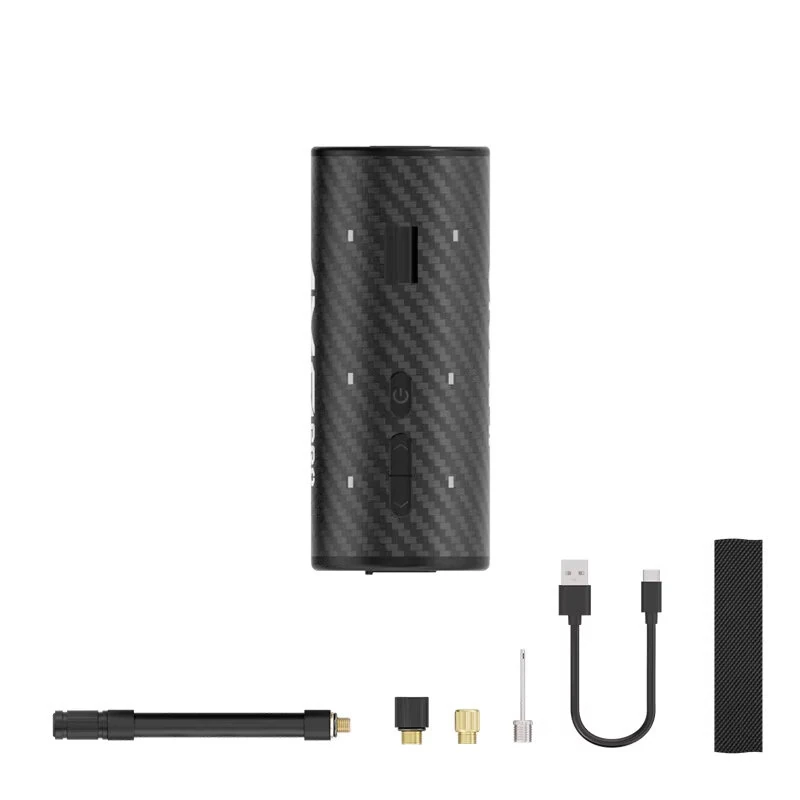
1 / 9 · Click to enlarge
CYCLAMI AM9 Pro Mini Bike Pump 130 PSI Portable Electric Tire Inflator with 2-in-1 Tail Light LED Display for MTB Road Bicycle
The CYCLAMI AM9 Pro Mini Bike Pump 130 PSI Portable Electric Tire Inflator with 2-in-1 Tail Light LED Display for MTB Road Bicycle is a premium product designed for everyday users. It features Model: AM9 PRO and Preset Pressure: 1-130 PSI / 0.1-3.5 BAR.
Available Offers
Free Delivery on this order. No minimum order value.
15-Day Easy Returns — hassle-free return & full refund.
Secure Payment — 100% safe checkout with UPI, Cards & Net Banking.
55% Off — you save ₹6,753 on this product!
Color: Black
Available Offers
5% Cashback
Pay with UPI & get 5% cashback (up to ₹50) via Razorpay
No-Cost EMI
Available on select bank cards at checkout. 0% interest for 3 months.
Free Shipping
Free delivery on all orders. No minimum order value.
Cash on Delivery
COD available on orders up to ₹5,000 across India.
Quick Specs
Ideal For
About This Product
The CYCLAMI AM9 Pro Mini Bike Pump 130 PSI Portable Electric Tire Inflator with 2-in-1 Tail Light LED Display for MTB Road Bicycle is a premium designed for everyday users. It delivers reliable performance at an accessible price.
Key Specifications
- Model: AM9 PRO
- Preset Pressure: 1-130 PSI / 0.1-3.5 BAR
- Battery Capacity: 450 mAh — extended runtime between charges
- Charging Port: Type-C —
- Size: Φ37.5 × 90 mm
- Pressure Unit: PSI / BAR
- Measurement Accuracy: ±1 PSI
- Weight: Approx. 126 g
Why Buy from Pricio?
Pricio sources this product directly, cutting out multiple middlemen. Every order includes free shipping, a 15-day return policy, and secure payment via Razorpay.
Features
1) 2-in-1 design combines an electric air pump and an RGB tail light with three modes, providing both inflation and visibility for enhanced safety.
2) Smart inflation with preset pressure function. The pump automatically stops once the target pressure is reached, preventing over-inflation and ensuring accuracy.
3) Extremely compact and lightweight design. Weighing only approximately 126g, this mini pump is easy to carry in your pocket or mount on your bike.
4) Powerful performance with a high-pressure output of up to 130 PSI. Capable of quickly inflating tires for road bikes, mountain bikes, and sports balls.
5) Features a clear LED display for real-time pressure monitoring and a convenient Type-C charging port for fast and easy power replenishment.
Package Included
1 x Mini Air Pump
1 x Air Hose
1 x FV Adapter
1 x AV Adapter
1 x Ball Needle
1 x Type-C Charging Cable
1 x Hook-and-Loop Strap
1 x User Manual


