
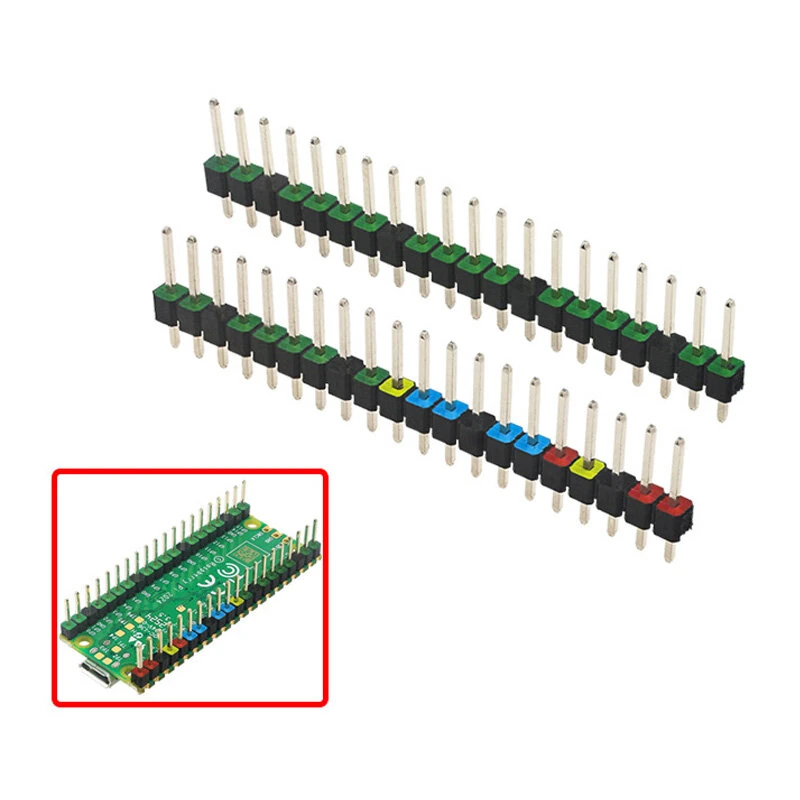
2pcs Raspberry Pi Pico Colorful Pin Header 20 Pins 2.54mm Spacing Gold-Plated Pins Quick Pin Identification Easy Soldering Electronic Components
The 2pcs Raspberry Pi Pico Colorful Pin Header 20 Pins 2.54mm Spacing Gold-Plated Pins Quick Pin Identification Easy Soldering Electronic Components is a value-for-money product designed for everyday users.
Available Offers
Free Delivery on this order. No minimum order value.
15-Day Easy Returns — hassle-free return & full refund.
Secure Payment — 100% safe checkout with UPI, Cards & Net Banking.
Available Offers
5% Cashback
Pay with UPI & get 5% cashback (up to ₹50) via Razorpay
No-Cost EMI
Available on select bank cards at checkout. 0% interest for 3 months.
Free Shipping
Free delivery on all orders. No minimum order value.
Cash on Delivery
COD available on orders up to ₹5,000 across India.
Ideal For
About This Product
The 2pcs Raspberry Pi Pico Colorful Pin Header 20 Pins 2.54mm Spacing Gold-Plated Pins Quick Pin Identification Easy Soldering Electronic Components is a value-for-money designed for everyday users. It delivers reliable performance at an accessible price.
Why Buy from Pricio?
Pricio sources this product directly, cutting out multiple middlemen. Every order includes free shipping, a 15-day return policy, and secure payment via Razorpay.
Number of Pins: 20 pins per header
Pin Spacing: 2.54mm
Pin Length: 11.5mm
Header Length: 51mm
Material: Gold-plated pins and plastic base (various colors)
Features:
1.Color-Coded Design: Simplifies Circuit Assembly These Raspberry Pi Pico colored pin headers are designed with different colors for quick pin identification, minimizing wiring errors and reducing installation time.
2.Standard 2.54mm Pin Spacing: Widely Compatible The pin spacing of these headers, set at the industry-standard 2.54mm, ensures broad compatibility with diverse electronic components and breadboards, making it perfect for various projects.
3.Gold-Plated Pins: Enhanced Conductivity The gold plating on the pins improves electrical conductivity and resists oxidation, ensuring a long-lasting, stable connection for all your electronic components.
4.Sturdy Construction: Reliable Connections The robust plastic base provides secure and stable pin alignment, preventing accidental dislodgement and ensuring continuity in your circuits even in demanding projects.
5.Easy to Solder: User-Friendly Assembly Designed for ease of soldering, these headers allow both beginners and experienced hobbyists to quickly and effectively create solid, reliable connections on their Raspberry Pi Pico boards.
Package Included:
2 x Raspberry Pi Pico Colored Pin Header (20 pins each)
(Note: The Raspberry Pi Pico is not includes)


