
1 / 7 · Click to enlarge
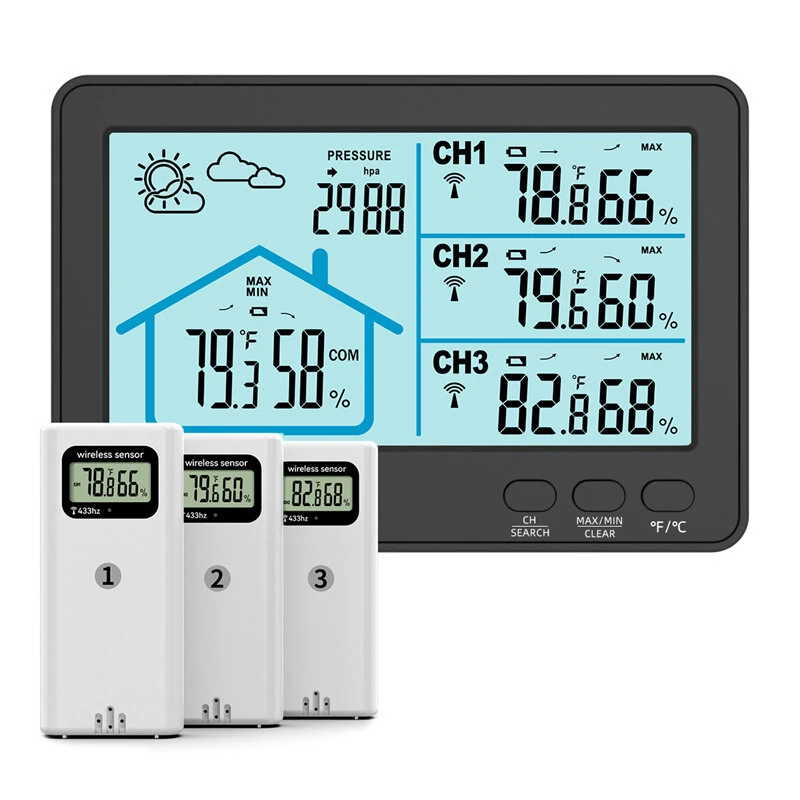
1-to-3 Wireless Weather Station Barometer Color LCD Screen Temperature Humidity Meter Freezing Point Reminder Rainproof Forecast Sensor
The 1-to-3 Wireless Weather Station Barometer Color LCD Screen Temperature Humidity Meter Freezing Point Reminder Rainproof Forecast Sensor is a mid-range product designed for everyday users.
Available Offers
Free Delivery on this order. No minimum order value.
15-Day Easy Returns — hassle-free return & full refund.
Secure Payment — 100% safe checkout with UPI, Cards & Net Banking.
Price: ₹4,163
Available Offers
5% Cashback
Pay with UPI & get 5% cashback (up to ₹50) via Razorpay
No-Cost EMI
Available on select bank cards at checkout. 0% interest for 3 months.
Free Shipping
Free delivery on all orders. No minimum order value.
Cash on Delivery
COD available on orders up to ₹5,000 across India.
Ideal For
About This Product
The 1-to-3 Wireless Weather Station Barometer Color LCD Screen Temperature Humidity Meter Freezing Point Reminder Rainproof Forecast Sensor is a mid-range designed for everyday users. It delivers reliable performance at an accessible price.
Why Buy from Pricio?
Pricio sources this product directly, cutting out multiple middlemen. Every order includes free shipping, a 15-day return policy, and secure payment via Razorpay.
Specifications:
Model: RX11-3B
Receiver Dimensions: 91*133*25mm
Screen Dimensions: 110*59mm
Transmitter Dimensions: 50*109*23mm (IP4 waterproof, rainproof)
Screen Dimensions: 11*23mm
Indoor Temperature Measurement Range: 14°F~122°F (-10°C~50°C)
Outdoor Temperature Measurement Range: -40°F~158°F (-40°C~70°C)
Temperature Resolution: 0.1°C/°F
Temperature Accuracy: ±1°C/±1.8°F
Humidity Range: 20%~95%
Humidity Resolution: 1%
Humidity Accuracy: ±5%RH (within the range of 30%-70%RH)
Temperature Display Unit: °C/°F selectable (default is °C)
Features:
1. Indoor and outdoor temperature and humidity display
2. Memory function for the highest and lowest temperature and humidity within 24 hours
3. Backlight (touch-activated for 10 seconds, stays on when plugged in)
4. Barometric pressure
5. Channel search/switching
6. Stand for tabletop placement
7. Hanging hole for hanging
8. Weather forecast (predicts weather trends for the next 24 hours)
9. Low battery reminder
10. °C/°F switching (default is °F upon startup)
11. Can connect up to 3 transmitters (standard package includes 3 transmitters)
12. Temperature and humidity trend indicator
14. Wireless reception range: 328ft/100m (open area), receiving frequency: 433MHz. Actual reception distance is subject to actual usage scenario.
14. Transmitter is waterproof, IP4 rating, rainproof.
15. Humidity comfort reminder function.
16. 24-hour maximum and minimum temperature and humidity recording.
Package Includes:
1 x Base Unit
3 x Outdoor Remote Sensors
1 x USB charging cable
1 x User manual


